Remember the frantic scribbling, the race against the clock, and the triumphant shouts of a unique answer? Scattergories, the classic word game, has delighted players for decades with its blend of vocabulary, creativity, and quick thinking. But in our increasingly digital world, gathering around a physical board might not always be feasible. Enter Online Scattergories Generators & Apps – the brilliant solution that brings all the fun of this beloved game directly to your screens, no matter where you or your fellow players are.
Whether you're organizing a virtual game night with friends across continents, looking for an engaging classroom activity, or simply wanting to sharpen your wits against the clock, digital Scattergories tools make it incredibly easy. They streamline setup, automate crucial steps, and often introduce new features that enhance the experience.
At a Glance: Key Takeaways for Digital Wordplay
- Effortless Setup: Forget physical boards, dice, and paper – online tools handle everything from letter generation to categories.
- Play Anywhere, Anytime: Perfect for virtual game nights, remote teams, or even solo practice, overcoming geographical barriers.
- Customization Galore: Many platforms let you tweak categories, timers, and player counts to suit your group.
- Variety of Options: From simple generators requiring screen sharing to fully integrated apps with built-in scoring and chat, there's a tool for every preference.
- Boost Your Brainpower: It’s not just fun; these games are fantastic for expanding vocabulary, quick recall, and creative problem-solving.
The Enduring Allure of Scattergories: A Quick Refresher
Before diving into the digital realm, let's quickly reacquaint ourselves with the game's timeless appeal. Created by Milton Bradley in 1988, Scattergories is a dynamic multiplayer game designed to challenge your vocabulary and encourage lateral thinking. The core objective is simple yet brilliant: over a series of rounds, players or teams must list unique words for various categories, with each word beginning with a randomly chosen letter.
Here’s how the traditional game typically unfolds:
- Players: Ideal for 2–6 players or teams, ages 12 and up.
- Preparation: You'd traditionally need category lists, a 20-sided die (designed to exclude less common letters like Q, U, V, X, Y, Z), and writing materials for each player or team.
- Gameplay Steps:
- Players divide into teams, each with their own response sheet.
- Everyone agrees on the list of categories for the round.
- A letter is rolled (the "starting letter").
- Players then have a fixed amount of time – typically 120 seconds – to brainstorm and write down a word for each category, ensuring it starts with the chosen letter.
- Once the timer runs out, pens down! Teams exchange papers for scoring.
- Scoring: One point is awarded for each unique, valid word in a category. If two teams have the same word for a category, neither gets a point. Creativity is key to scoring big! A maximum of three points can usually be earned per category in a round.
- The game continues for multiple rounds with new letters, and the team with the most points at the end wins.
The beauty of Scattergories lies in its blend of simplicity and endless replayability. The combination of categories and letters constantly creates new challenges, making every round a fresh test of your linguistic agility.
Why Move Your Wordplay Online? The Digital Advantage
If the traditional game offers so much joy, why bother taking it online? The shift to digital isn't just about convenience; it opens up a world of possibilities that enhance the Scattergories experience, especially in today's interconnected world.
First and foremost is unparalleled accessibility. Physical distance is no longer a barrier. Friends, family, and colleagues from different cities, states, or even countries can effortlessly connect for a game night. No more coordinating schedules for in-person meetups; a quick virtual call is all it takes. This makes it a perfect choice for staying connected with loved ones or fostering team camaraderie in a remote work environment.
Then there's the sheer ease of setup. Forget scrambling for pencils, paper, or hunting down that elusive 20-sided die. Online Scattergories generators and apps automate all the logistical heavy lifting. A single click can generate a random letter, present a fresh list of categories, and start a timer. This drastically cuts down on preparation time, getting you straight to the fun part without any fumbling. It also means you never have to worry about running out of category sheets or losing game components.
Many digital platforms also offer enhanced customization. While the original game has set category cards, online versions often allow you to create and save your own custom categories. This feature is a game-changer for themed parties, educational settings (imagine "Science Terms" or "Historical Figures"), or simply tailoring the game to your group's interests and inside jokes.
Finally, the dynamic nature of online play can add a new layer of excitement. Some apps integrate real-time scoring, in-game chat, and even leaderboards, transforming the game into a more interactive and competitive experience. Even simpler generators, when combined with video conferencing tools, create a lively social event that rivals in-person play. This fusion of familiar gameplay with modern technology ensures that Scattergories remains a relevant and enjoyable pastime for the digital age.
What Makes a Stellar Online Scattergories Generator or App?
Not all digital tools are created equal. When you're sifting through the various Online Scattergories Generators & Apps, knowing what features to look for can significantly improve your game experience. The best platforms blend essential game mechanics with user-friendly design and flexible options.
Random Letter Generation: The Heart of the Game
At its core, Scattergories relies on a random starting letter. A good online tool will reliably generate letters, often mimicking the roll of the game's specific 20-sided die, which omits less common letters (Q, U, V, X, Y, Z) to keep gameplay engaging. A simple "Roll Letter" button is standard, and some even include visual dice animations for that authentic feel.
Flexible Timer Options: Setting the Pace
The ticking clock is a crucial element of Scattergories, injecting urgency and excitement. Excellent online generators and apps provide adjustable timers, allowing you to set round durations from as short as 10 seconds for a quick brain break to 10 minutes for more contemplative play. Look for clear visual timers, audible alerts (like a "Time's Up!" sound or screen), and the ability to easily pause or restart if needed. This flexibility is vital for adapting the game to different age groups or play styles.
Customizable Category Lists: Tailoring the Challenge
While pre-built category lists are convenient, the ability to customize is where online tools truly shine. A top-tier generator will offer:
- Multiple Pre-set Lists: Providing variety and fresh challenges with each game.
- Adjustable Category Count: Letting you choose anywhere from 5 to 20 prompts per round.
- User-Defined Categories: This is a must-have. Whether for an office team-building exercise with industry-specific terms, a birthday party with inside jokes, or an educational setting, adding your own categories makes the game infinitely more personal and relevant. A simple "Add Category" or "Edit List" function is what you're looking for.
Intuitive User Interface & Mobile Responsiveness
Nobody wants to wrestle with a clunky interface when trying to have fun. A great online Scattergories tool boasts a clean, uncluttered design that's easy to navigate. Buttons should be clearly labeled, and information (letter, timer, categories) should be prominently displayed. Furthermore, in an age where many people play on the go, full responsiveness across various devices – desktops, laptops, tablets, and smartphones – is non-negotiable. The game should look and function flawlessly, regardless of screen size.
Seamless Multiplayer Integration: How to Play Together
This is perhaps the biggest differentiator among platforms:
- Screen Sharing Dependent: Simpler generators, like many free web tools, rely on one player sharing their screen via a video conferencing platform (Zoom, Google Meet, etc.). Players view the shared screen, write their answers locally, and then share them for scoring. This works well but requires some manual coordination.
- Built-in Game Rooms & Chat: More sophisticated apps create virtual game rooms where players join, see the categories, type their answers directly into the app, and often communicate via in-game chat. This offers a more integrated and automated experience.
- Anonymous Play: Some platforms allow you to jump into games with strangers, perfect for quick, casual rounds.
Automated vs. Manual Scoring & Validation
Scoring can be a contentious point in Scattergories. Online tools offer different approaches:
- Fully Automated: Some apps attempt to validate answers and score automatically, cross-referencing against other players' responses. While efficient, this can sometimes be rigid with creative answers.
- Assisted Scoring: The tool might highlight duplicate answers, but players still manually determine validity.
- Manual Scoring: You exchange answers and score them yourselves, just like the physical game. This allows for human judgment on subjective answers, which is often preferred for maintaining fun.
Educational Perks: More Than Just a Game
Beyond pure entertainment, many users find value in the cognitive benefits. A good online Scattergories tool inherently supports:
- Vocabulary Development: Constantly searching for words expands your lexicon.
- Categorization Skills: Practicing grouping and associating words.
- Creative Thinking: Encouraging out-of-the-box answers for less obvious categories or letters.
- Processing Speed: The timer forces quick recall and decision-making.
These benefits make Online Scattergories Generators & Apps valuable not just for game nights but also as effective educational warm-ups, brain breaks, or literacy lessons.
Spotlight on Top Online Scattergories Platforms & Apps
The digital landscape offers a diverse array of tools for playing Scattergories. Each platform brings its own flavor, features, and advantages to the virtual table. Let's explore some of the most popular and effective options available today.
ScattergoriesOnline.net: The Go-To for Many
Often cited as a favorite, ScattergoriesOnline.net provides a free, no-frills version of the game that's accessible and widely used.
- Features: It supports over 40 languages, making it incredibly versatile for a global audience. Users can customize the number of players and rounds. Notably, it even offers a solo play mode where you can compete against AI "robots," which is fantastic for practice or when you can't gather a group.
- Pros: Very easy to pick up and play; no sign-up required for basic gameplay; good for international groups.
- Cons: The interface is functional but not particularly flashy. While it supports multiple players, it often requires external communication (like a video call) for discussion and scoring, as it doesn't have built-in voice chat.
Stopots.com: Integrated & Interactive
For those seeking a more integrated experience, Stopots.com is a robust option available via web, Android, and iOS apps.
- Features: It boasts anonymous play options, in-game chat, and significant automation of game steps, from entering answers to validation. Players can type their answers directly into the platform.
- Pros: Cross-platform availability; good for spontaneous games with strangers or friends; automated scoring streamlines gameplay; in-game chat keeps communication central.
- Cons: Contains ads, which can be distracting for some users. While optional, login via Facebook, Twitter, or Google is presented, which some players might prefer to avoid for privacy reasons.
Swellgarfo.com: Clean, Simple, Ad-Free
If minimalism and an ad-free experience are your priorities, Swellgarfo.com is an excellent choice.
- Features: This generator offers a wonderfully simple, clean design. You can easily adjust the number of lines (categories) and the timer. It focuses purely on generating the game elements.
- Pros: Completely free and ad-free, making for an uninterrupted experience; very straightforward to use; ideal for those who prefer to manage social interaction via a separate video call.
- Cons: It relies heavily on one person sharing their screen to display the categories, letter, and timer to the group. Scoring is entirely manual, requiring teams to cross-check answers themselves. It's more of a generator than a full game app.
ESLKidsGames.com: Education-Focused Fun
Designed with a specific niche in mind, ESLKidsGames.com is tailored to help children improve their English language skills.
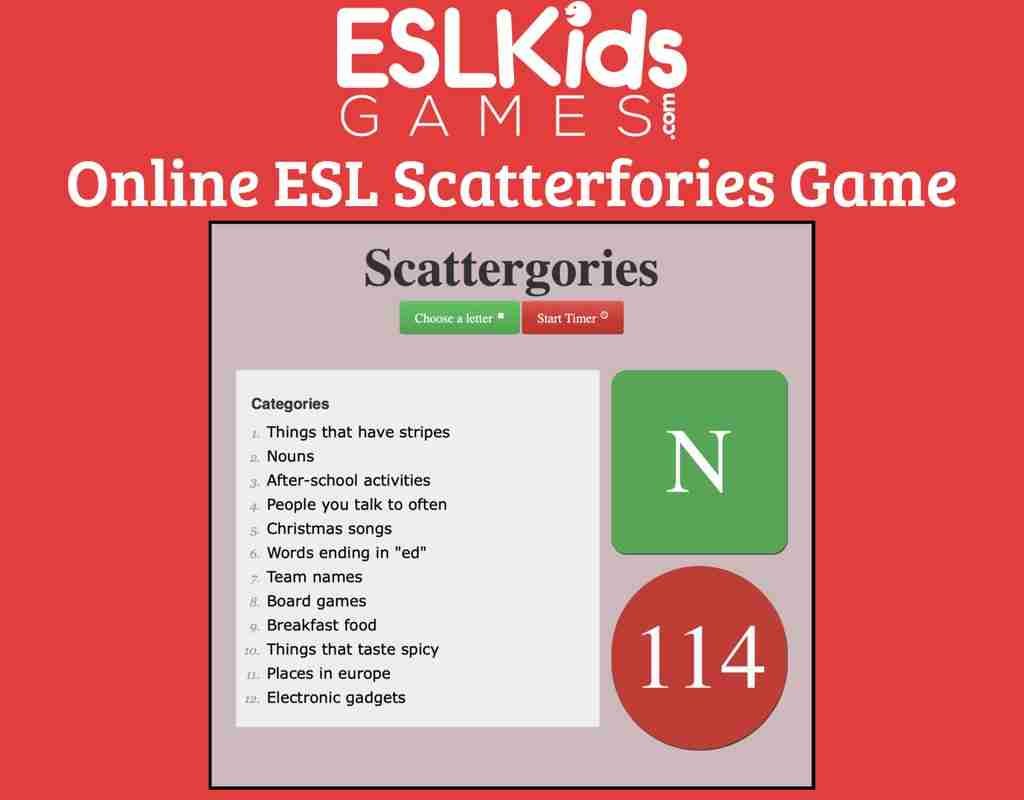
- Features: It provides a basic Scattergories game flow. To play with others, a Zoom call (or similar) is required, with one user sharing their screen to present the game. The game starts with a simple "Choose a letter" button and a timer setting.
- Pros: Excellent for educational purposes, especially for younger learners or those learning English; simple, non-intimidating interface.
- Cons: Not a full-fledged multiplayer app; requires external conferencing for group play and manual scorekeeping, which might be too hands-on for some casual players.
Scattergories by Mimic.inc: Mobile-First Visuals
For those who prefer a dedicated mobile app with a polished look, Scattergories by Mimic.inc (available for download) stands out.
- Features: It boasts impressive graphics and often includes themed categories, adding a fresh twist to the gameplay.
- Pros: Visually appealing and very engaging on mobile devices; themed categories keep things interesting.
- Cons: Gameplay is typically limited to one-on-one matches against friends who also have the app, restricting group play. There’s also a restriction on the number of free games you can play per day, nudging users towards in-app purchases or subscriptions.
AhaSlides (Spinner): A Versatile Tool for Engagement
While not a dedicated Scattergories game, AhaSlides offers a powerful Spinner feature that functions exceptionally well as an online letter generator, complete with in-built templates.
- Features: Its Spinner is easy to use, offers quick navigation, and integrates seamlessly with Zoom and other virtual conference tools. It can be combined with other interactive features like live polls, word clouds, and quizzes, making it a versatile tool for presentations or interactive sessions.
- Pros: Highly customizable spinner for letters; excellent for facilitators or educators; strong integration with conferencing tools; adds interactivity beyond just Scattergories.
- Cons: Since it's a multi-purpose presentation tool, it doesn't automate the entire Scattergories game flow (like category display or scoring) itself. You'd use the spinner for the letter and then manage categories and scoring externally.
Dedicated Online Generators: Your Flexible Workhorse
Many websites offer streamlined, purpose-built Online Scattergories Generators & Apps designed for quick and flexible gameplay without physical supplies. These often resemble the functionality of our Scattergories generator tool.
- Letter Generation: These tools universally feature a prominent "Roll Letter" button, instantly generating a random starting letter for each round.
- Timer Functionality: Users can typically set round durations from as short as 10 seconds to as long as 10 minutes, with a clear countdown and a "Time's Up!" notification.
- Customizable Categories: The "Categories box" is a key feature, allowing users to define 5 to 20 prompts per round. The ability to "Add Category" means you're never limited to pre-set lists.
- Gameplay: Players list words for the displayed categories starting with the chosen letter. Scoring is usually manual, with unique answers earning points and duplicates being crossed out. Rounds can be instantly restarted for continuous play.
- Educational Benefits: These generators are fantastic for supporting vocabulary development, categorization skills, creative thinking (encouraging less-obvious answers), and improving processing speed. They can be used as warm-ups, brain breaks, or literacy lessons.
- Usage Ideas: Applicable for morning warm-ups, subject-related learning (e.g., science, geography), challenging older students to create categories, practicing mental math by recording scores, and enriching family game nights.
- Accessibility: They are typically free to use and fully responsive on mobile devices, including tablets and phones, ensuring broad accessibility.
The choice among these platforms often comes down to your group's specific needs: do you prefer full automation, total customization, mobile convenience, or a simple, clean generator that pairs well with your existing video call setup?
Choosing Your Digital Arena: A Guide to Picking the Right Tool
With so many Online Scattergories Generators & Apps available, how do you decide which one is right for your next game night, classroom activity, or team-building exercise? The best choice depends on a few key factors that shape your desired experience.
- Number of Players and Teams:
- Small, Casual Group (2-6 players): Simpler generators like Swellgarfo.com or a dedicated tool like our Scattergories generator tool paired with Zoom work perfectly.
- Larger Groups/Teams: Consider platforms like ScattergoriesOnline.net, which can accommodate more players, or use a screen-sharing generator where teams break into smaller virtual rooms for discussion before presenting answers.
- Solo Play: ScattergoriesOnline.net with its robot opponents is a great option for individual practice.
- Desire for Automation vs. Manual Control:
- Highly Automated (Scoring, validation, in-app answers): Stopots.com is a strong contender here, minimizing manual effort.
- Hybrid (Automated setup, manual scoring): Most screen-sharing generators fall into this category, giving you the flexibility to judge subjective answers.
- Full Manual Control: Swellgarfo.com or ESLKidsGames.com, where you manage scoring and discussion, are great if you enjoy the traditional negotiation aspect.
- Tolerance for Ads:
- Ad-Free Preference: Swellgarfo.com is explicitly ad-free. Many basic generators also avoid intrusive ads.
- OK with Ads: Stopots.com offers a robust experience but includes ads. Mobile apps might have ads or premium tiers.
- Device Preference:
- Web-Based (Desktop/Laptop): Almost all generators (ScattergoriesOnline.net, Swellgarfo.com, etc.) are browser-based and work well on larger screens.
- Mobile App Specific: Scattergories by Mimic.inc is built for mobile, offering a dedicated app experience. Stopots.com also has mobile apps. Ensure any web-based generator is responsive if playing on a tablet or phone.
- Specific Use Case (Educational, Casual, Competitive):
- Educational: ESLKidsGames.com is tailored for learning, and any generator with custom categories (like our Scattergories generator tool) is excellent for subject-specific vocabulary.
- Casual Game Night: Flexibility and ease of use are key. ScattergoriesOnline.net or a simple generator with Zoom are ideal.
- Competitive Play: Features like in-game chat and automated scoring (Stopots.com) can enhance the competitive feel.
By weighing these factors against your group's unique needs and preferences, you can confidently select the Online Scattergories Generators & Apps that will lead to the most enjoyable and seamless virtual game experience. Don't be afraid to try a few different options to see what clicks best with your players!
Pro Tips for a Flawless Virtual Scattergories Night
Transitioning your Scattergories game from a physical table to a virtual one can be incredibly fun, but a few pro tips can make the difference between a good game and a great one. Smooth execution ensures everyone focuses on the wordplay, not the tech.
1. Choose Your Communication Platform Wisely
Most Online Scattergories Generators & Apps that aren't fully integrated game rooms will require a separate video conferencing tool.
- Zoom, Google Meet, Microsoft Teams: These are popular choices for their screen-sharing capabilities and ease of use. Ensure everyone has a stable internet connection and knows how to use the chosen platform.
- Audio Quality First: Encourage players to use headphones with a microphone to minimize background noise and echoes, making discussions clearer.
2. Master the Art of Screen Sharing
If you're using a generator that displays the letter and categories, one person needs to be the designated "screen sharer."
- Clear Display: Make sure the generator's window is full-screen or prominently displayed before sharing. Adjust font size if necessary so categories are easily readable for everyone.
- "Share Screen" vs. "Share Window": Often, sharing a specific window (the browser tab with the game) is better than sharing your entire screen, preventing accidental displays of personal information.
- Pin the Sharer: Instruct players to "pin" the screen sharer's video feed in their conferencing tool to keep the game board prominent.
3. Establish Clear Scoring Rules Upfront
This is crucial for preventing disputes and keeping the game flowing.
- Subjective Answers: How will you handle borderline answers (e.g., "Kiwi" for "Things that are green" if the letter is K – is it the fruit or the bird? Both fit)? Agree on a simple majority vote or a designated "game master" who makes the final call.
- Duplicates: Reiterate that if multiple players have the same valid word for a category, no one gets a point for that specific entry. This encourages creative thinking!
- Timer Adherence: Emphasize that once the timer sounds, all writing must stop. No last-second scribbles.
4. Managing the Timer and Rounds Effectively
- Audible Alerts: Ensure the timer on your chosen generator has an audible "Time's Up!" alert that everyone can hear.
- Visible Timer: The timer should be clearly visible on the shared screen, adding to the real-time pressure.
- Designate a Timer Keeper: Even if automated, one person should keep an eye on the timer and announce the start and end of rounds.
5. Foster Fair Play and Fun
- No Cheating: Remind players that consulting search engines or other external resources defeats the purpose and fun of the game. Trust is key in virtual games.
- Encourage Creativity: The magic of Scattergories is in the unique, clever answers. Encourage players to think outside the box.
- Breakout Rooms for Teams: If playing in teams, use breakout room features in your conferencing tool to allow teams to huddle and discuss their answers (and challenge others' answers) privately before reconvening for scoring.
6. Troubleshooting Common Issues
- "Can't Hear/See": The most common issues are audio and video. Have players check their microphone/speaker settings. For visibility, ensure screen sharing is active and they've pinned the correct screen.
- Lag/Connectivity: If someone's connection is spotty, consider turning off video for a round to prioritize audio and shared screen stability.
- Practice Round: If players are new to online Scattergories, start with a short, non-scoring practice round to get everyone comfortable with the tools and rules.
By implementing these practical tips, you can transform your virtual game night into a lively, competitive, and laugh-filled Scattergories extravaganza.
Beyond Entertainment: Creative Applications for Online Scattergories
While inherently a game, Online Scattergories Generators & Apps possess a surprising versatility that extends far beyond casual entertainment. Their core mechanics make them potent tools for learning, team building, and sparking creativity in various settings.
1. Engaging Classroom Tool
Educators can leverage online Scattergories to make learning interactive and fun.
- Subject-Specific Learning: Create custom categories tailored to your lesson plan. For a science class, categories could be "Elements on the Periodic Table," "Types of Ecosystems," or "Famous Scientists." For history, try "World War II Events" or "Ancient Civilizations." This transforms vocabulary and factual recall into an exciting challenge.
- Vocabulary Building: Simply playing the game naturally expands a student's lexicon. Challenging students to find synonyms or less common words boosts their word power.
- Brain Breaks & Warm-Ups: A quick, 5-minute round at the start of a class or mid-lesson can re-energize students and get their minds thinking laterally.
- Literacy and Critical Thinking Lessons: The game encourages categorizing, inferring, and quick decision-making under pressure – all crucial literacy and critical thinking skills.
2. Virtual Team-Building for Workplaces
Remote work often lacks the spontaneous interactions of an office. Online Scattergories can bridge that gap.
- Icebreakers: A lighthearted game can help new team members get to know each other or break the ice at the start of a meeting.
- Team Cohesion: Playing together fosters communication, friendly competition, and shared experiences, strengthening bonds among colleagues.
- "Work-Themed" Categories: Create categories related to your industry, company values, or even inside office jokes (e.g., "Things we do in stand-ups," "Common software terms"). This makes the game highly relevant and engaging for the team. Engaging in activities like this is a great way to boost remote team morale and collaboration.
3. Enhancing Family Game Nights
Beyond the typical board games, online Scattergories offers a fresh, dynamic option for family fun.
- All Ages (with adjustments): While the official age is 12+, categories can be simplified for younger players (e.g., "Animals," "Colors," "Foods") to make it inclusive.
- Generational Bonding: Grandparents, parents, and children can all participate from their respective homes, creating shared memories across distances.
- Holiday or Event Themes: Design categories around holidays ("Things associated with Christmas," "Halloween costumes") or family events (e.g., "Wedding guest list items," "Baby shower gifts") to add a personal touch.
4. Creative Writing Prompts and Brainstorming
For writers, content creators, or anyone needing a spark of inspiration, Scattergories can be an unconventional muse.
- Story Starters: A list of words generated from a Scattergories round can serve as unexpected prompts for short stories, poems, or character development.
- Brainstorming Sessions: Use custom categories to brainstorm ideas for projects, marketing campaigns, or problem-solving initiatives. The time limit encourages rapid ideation.
5. Party Games & Social Events
Online Scattergories is a fantastic addition to any virtual social gathering.
- Birthday Parties: "Things for a birthday party," "Gifts that start with [letter]."
- Virtual Happy Hours: A fun, competitive element to add to your online catch-ups.
- "Guess the Category" Twist: Instead of providing the categories upfront, reveal only the letter and then have players guess the category after giving their answer for it, adding another layer of challenge.
The adaptability of Online Scattergories Generators & Apps means they are far more than just a digital version of a classic game. They are powerful, flexible tools for engagement, learning, and connection in a world that increasingly values virtual interaction.
Your Burning Questions Answered: Online Scattergories FAQs
Even with the ease of online play, you might have some lingering questions. Here are answers to common queries about playing Scattergories in the digital realm.
Are all online Scattergories versions truly free?
Many of the most popular Online Scattergories Generators & Apps, such as ScattergoriesOnline.net, Swellgarfo.com, and generic generators like our Scattergories generator tool, are completely free to use. Some mobile apps (like Mimic.inc's Scattergories) might offer free games with daily limits or include ads, prompting in-app purchases for an ad-free or unlimited experience. Always check the platform's specific terms if you prefer an uninterrupted, ad-free experience.
Can I play with more than 6 players?
While the traditional game is designed for 2–6 players or teams, online versions offer more flexibility. For larger groups, you can easily divide players into more than 6 teams. With screen-sharing generators, everyone views the same screen, and teams work collaboratively. For apps with built-in rooms, you might be limited by the app's specific player capacity per room, but some allow multiple rooms or larger group sizes. Just remember that scoring for very large groups can become more time-consuming if done manually.
How do you resolve disputes over subjective answers in online play?
This is a classic Scattergories challenge! In online play, a designated "game master" or "host" can act as the final arbiter. Alternatively, you can implement a simple majority rule: if most players agree an answer is valid, it counts. For controversial words, a quick poll in your video conferencing tool (if available) can help. The key is to agree on a fair method before the game starts to avoid prolonged debates and keep the fun flowing.
Is solo play possible with online generators and apps?
Yes! Some Online Scattergories Generators & Apps, most notably ScattergoriesOnline.net, offer a solo play mode where you can compete against AI opponents or simply challenge yourself against the clock to see how many unique words you can generate. This is a fantastic way to practice, boost your vocabulary, or enjoy a quick mental workout when no one else is available to play.
Ready, Set, SCATTER! Your Next Virtual Game Awaits
The world of Online Scattergories Generators & Apps has completely transformed how we play this beloved word game. No longer constrained by physical proximity or missing game pieces, you now have a diverse array of tools at your fingertips to host an engaging, brain-teasing, and utterly fun virtual game night, educational session, or team-building exercise.
From the simplicity of a screen-shared generator to the integrated features of a dedicated app, there's a digital solution to fit every need and preference. These tools don't just replicate the classic game; they often enhance it with customization, accessibility, and modern conveniences, making it easier than ever to gather your friends, family, or colleagues for a memorable linguistic challenge.
So, go ahead! Explore the options, choose the platform that best suits your style, and get ready to unleash your inner wordsmith. The clock is ticking, the categories are waiting, and your next unique, points-scoring word is just a thought away. Get ready to scramble for words and discover the joy of digital Scattergories!